\ DriveHQ Customer Support Forum \
已读/回复 : 49315/6
  • jbrowne
  • (6帖子)

If I synchronize my files so that the remote files match my local files, will I lose my remote files if my computer crashes?  Also, if I delete a file in my local folder, will the remote synchronized file also be deleted?


2009/1/26 8:27:56

  • DriveHQ Webmaster
  • (1098帖子)
主题: Re: File synchronization

If your computer crashes, the remote files will not be deleted. But if you delete your local files, the remote files will also be deleted.

Anyway, Folder Synchronization could be used for backup purpose, but is less reliable than Online Backup:

  • You can only synchronize a small folder;
  • When you delete a file on local (or remote), the corresponding file on server will also be deleted;
  • If you accidentally changes a file, the remote file will also be changed. There is no version history info as compared with Online Backup.

回复
2009/1/26 10:44:15

  • villita08
  • (3帖子)
主题: Re:File synchronization

how I can retrieve a deleted folder by mistake


回复
2010/12/6 1:17:41

  • vgchiang
  • (7帖子)
主题: Re:File synchronization

Hi villita08,

Could you clarify your problem for us?  Was the folder deleted due to synchronization?  If so, the folder should be present in a folder called _DHQ_SyncCache_.  This folder contains folders that were deleted automatically when their sync folder was deleted by you.  This folder can be found in the parent folder of the deleted folder, or the folder containing the deleted file. 

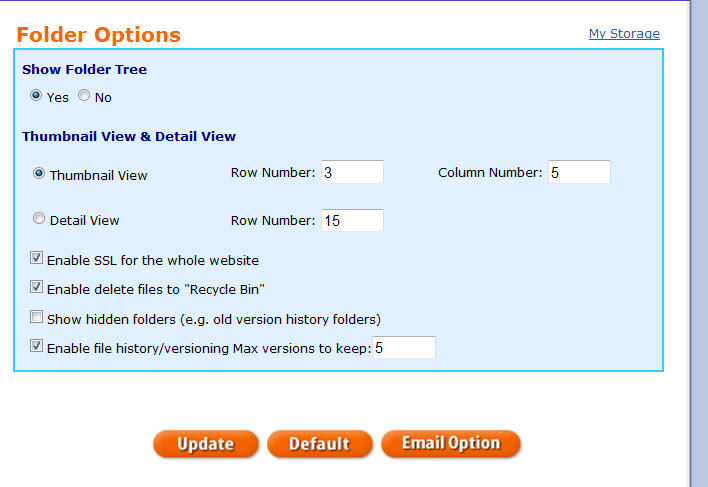
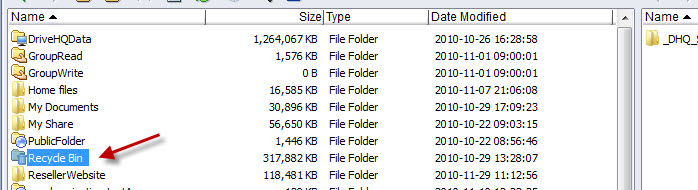
If you deleted a regular folder, then it might still be retrievable- that is if the recycle bin feature is enabled.  To find out if it is, on the website, go to your Account Details page -> Account Options.  See if "Enable Delete Files to Recycle bin" is checked.  In File Manager go to Tools -> Folder Options -> set remote folder options.  If it is checked, you'll be able to see deleted folders in the Recycle Bin folder under My Storage.
 

Hope this helps!


回复
2010/12/6 11:43:31

  • villita08
  • (3帖子)
主题: Re:File synchronization

hello many thanks for your information. but I could not solve my problem, delete a folder by mistake and I can not retrieve it in where I set my mind could not enable it this box Enable file history / versioning Max versions to keep, or the Enable SSL for the whole website and I would like to recover.
I thank you in advance.


回复
2010/12/7 8:31:52

  • villita08
  • (3帖子)
主题: Re:File synchronization

Hi I would like to know also that the delete the folder 03/dec/2010

gracias.


回复
2010/12/7 8:41:20

  • DriveHQ Webmaster
  • (1098帖子)
主题: Re:File synchronization

The "Recycle Bin" feature is available to all users; you just need to enable it. 


"Enable file history / versioning",  "Max versions to keep", and the "enable SSL for the whole website" are premium features. you must order our service to set these options. 


Without these features enabled, and if you deleted a remote folder / file, it is indeed deleted. Sorry we cannot help you recover.


回复
2010/12/12 1:33:42

收藏并分享
快速回复

请 登录 回复如下: 还不是DriveHQ会员?


Leading Cloud Surveillance service

Leading Enterprise Cloud IT Service Since 2003