DriveHQ 开始菜单
云盘映射
文件夹同步
文件投递箱
FTP/SFTP 主机托管
组帐户
远程桌面
DriveHQ 开始菜单
在线文件服务器
我的存储空间
|
管理共享
|
发布内容
|
文件投放箱
WebDAV 云盘映射
云盘首页
|
WebDAV 云盘指南
|
云盘映射工具
完整数据备份
备份指南
|
云到云备份
|
IP摄像头备份
FTP、电子邮件和网络服务
FTP/SFTP 主机托管
|
电子邮件托管
|
网站托管
|
网络摄像头托管
云监控和远程桌面
远程桌面
|
远程访问电脑
|
云监控
|
虚拟闭路电视网络录像机
快速链接
安全与隐私
客户支持
服务手册
用例
组帐户
在线帮助
支持论坛
联系我们
关于 DriveHQ
报名
登录
特性
面向企业的功能
在线文件服务器
FTP托管
云盘映射
云文件备份
电子邮件备份和托管
云文件共享
文件夹同步
组帐户
文件投递箱
全文检索
单点登录
移动访问
个人特征
个人云盘
备份所有设备
移动应用
个人网站托管
儿童子账户
家庭监控
云监控和远程桌面
远程桌面服务
CameraFTP 云监控
软件
云盘映射工具
DriveHQ 文件管理器
DriveHQ 在线备份
DriveHQ 移动应用
CameraFTP 软件和应用程序
DriveHQ远程桌面
定价
商业计划与定价
个人计划及定价
与其他产品的价格比较
与其他产品的功能比较
CameraFTP 云录制服务定价
DriveHQ远程桌面 服务定价
登录
正在登录……
必须提供用户名或电子邮件地址!
需要输入密码!
保持登录状态
快速登录
忘记密码
注册
帮助
支持主页
支持论坛
服务手册
在线帮助
教程视频
远程支持
关于 DriveHQ
联系
CameraFTP 支持
DriveHQ Online Help
Welcome to DriveHQ Cloud IT Service
Getting started with DriveHQ
Using DriveHQ Web
DriveHQ Start Menu
Account and Billing
FAQ
Create a new DriveHQ account
3 types of user accounts on DriveHQ
Manage your account
Create a group
Deposit or make a payment
Transfer funds to another user
Order a subscription
Cancel a subscription
My storage
My storage
FAQ on Uploading/Downloading/Editing Files
Are there limits on how much I can upload?
What should I do when DriveHQ FileManager pop up a message box to prompt that I am a free account?
Why is upload so slow?
Why does the remaining time on my upload keep changing?
What happens if I interrupt an upload/download?
What is the best way to upload/download a Large amount of data?
Can I keep a backup copy of each file (version) that I upload?
When downloading, I can "Open" or "Save" the file. Which should I choose?
Why is there an 200MB limit on download bytes for free account?
Can multiple users edit the same document simultaneously over the web?
How do I directly edit documents over the web?
What should I do if I continue to have problems uploading?
Download Files
Upload Files
View or Edit Cloud Files
Folder Options
Recycle Bin and File Versioning
Photo and Video
Complete Backup
What is DriveHQ Online Backup?
How does it work and how to get started with DriveHQ online Backup?
How can DriveHQ make sure my files are secure on the Internet?
Why do I need a backup service?
I have local backup using a USB drive, what is the advantage of DriveHQ backup?
Should I use Real-time backup or scheduled backup?
Can I back up multiple computers using the same DriveHQ account?
Which folders should I backup? Do I just backup the whole C: drive?
Do you support incremental backup or you upload all files every time?
Do you keep file version history?
I have a small business with 10 employees and 12 PCs, what is the best way to backup all PCs?
Can it backup my (Outlook) emails?
Why is your service not free?
Remote Management
File Sharing
File Sharing FAQ
Can I share folders to non-users?
How do I share folders with other users of DriveHQ?
How can I prevent users from changing files in a shared folder?
Can I invite someone to upload files into a folder in my account if they do not have a DriveHQ account?
What is the maximum file size that will work using E-Send?
Share Link is Not Working
How do I change a Share I created?
Can I keep a backup copy of each file (version) that I upload?
How to share folders to other users?
How to create a group share?
How to access folders shared by other users?
How to manage existing shares?
Bandwidth Limit on Sharing and Publishing Files
File Publishing/Linking
File Publishing FAQ
Can guest access the publish?
How do I charge for my publish?
Are there any limits on publish?
How do I change a Publish I created?
Is there a period of validity for the Publish Link?
Publish Folder
How to publish folders to others?
How to manage existing published folders?
Bandwidth Limit on Sharing and Publishing Files
Publish Websites
How to publish my websites?
How to manage my website HTML files?
How to host you private domain website?
Advanced
email
bbs
contacts
Business And Personal Web Hosting Solution
Create a Personal Website
Create a Business Website
SMTP/POP3 Email Service
E-Commerce Hosting Service
Group Account Management
Manage Subusers and Subgroups
Cloud Drive Mapping
Cloud Drive Mapping
Using DriveHQ Client Software
WebDAV Cloud Drive Mapping Tool
DriveHQ Cloud Drive Mapping Tool for Mac
Map Cloud Drive
DriveHQ Online Backup 6.0
Introduction
Installation
Sign Up
Log On Online Backup
Quick Task
Advanced Task
Email Backup
Manage Tasks
Restore
Options
Advanced Features
Windows Explorer Integration
Run as a service and network backup
Encrypted File Storage
DriveHQ Online Backup For Mac
Create new backup
Restore backup task
DriveHQ FileManager 6.0
What's new?
How to install?
How to use DriveHQ FileManager?
Manage Local Files/Folders
Manage Online Files/Folders
Transfer Files/Folders
Work Offline
Share Files/Folders
Publish Files/Folders
Synchronize Folder
Access other's Publish
Backup Files / Folders
Edit Photos in Batch PhotoEditor
Windows Explorer Integration
Account Setting and Options
DriveHQ FileManager for Mac
DriveHQ FileManager Mobile
DriveHQ FileManager for iPhone
DriveHQ FileManager for Android
DriveHQ FileManager for Windows Mobile
DriveHQ FileManager Lite for Tablets
DriveHQ EmailManager 2.0
How to install?
EmailManager Main screen
Manage Local Email Files/Folders
Manage Online Email Files/Folders
Transfer Email Files/Folders
Backup emails
Account Setting and Options
FTP Hosting Service
What is DriveHQ's FTP Site?
What FTP client should I use to access DriveHQ's FTP Site?
What is the No.1 technical advice that users should know?
I am a DriveHQ user, how do I log on DriveHQ's FTP Site?
I am not a DriveHQ user, and I have received a share notification e-mail from my friend. How can I access the shared folder through FTP?
What access level will I have for a shared folder?
Can I log on anonymously to access a published folder?
I want my clients to post files to me, how can I create an client FTP account?
How much does it cost to host my FTP site at DriveHQ.com?
Is there additional bandwidth limit on FTP access?
Email Hosting Service
FAQ about DriveHQ SMTP/POP3/IMAP Email Hosting
Get started with DriveHQ Email service
Sign up an account on DriveHQ.com
Access DriveHQ email hosting service
Configure DriveHQ Email on computers and mobile devices
How to configure DriveHQ email for MS Outlook/Office 365?
How to configure DriveHQ email on mobile devices?
How to configure DriveHQ email for older version MS Outlook?
How to configure DriveHQ email for Outlook Express?
How to configure DriveHQ email for Foxmail?
How to configure DriveHQ email for Eudora?
How to configure DriveHQ email for Lotus Notes?
Using DriveHQ Group Email service
DriveHQ group account
Group account management
Order group user licenses
Setup company domain emails
Other advanced email features
Common business email service issues
Web Hosting Service
About DriveHQ web hosting service
Do I have to have a domain name in order to sign up?
What name will have my web site?
Do you sell Domains?
I want to make a website, but I have no idea what I'm doing. Where do I start?
How can I upload content of my new web site?
What are the file names that I can use to set one of my HTML pages to be the default loading one?
How do I FTP to my site with Internet Explorer?
I receive an error when trying to FTP to my site.
What is data transfer?
File Drop Box
File Drop box folder
Accessing Uploading (dropping) files into a Drop Box
Accessing Files Uploaded to a Drop Box Folder
Partnership Programs
What is DriveHQ Affiliate Program?
What is the benefit to me, my customers and my website visitors?
Is there any cost or requirement to become an affiliate?
I am outside of the United States; can I be an affiliate?
How do I sign up?
Are there any requirements to my web site?
How and where do I place the "Referral Link or Referral Banners"?
Can I use DriveHQ's content on my site?
How do I know how much I've sold and earned?
How and How often do I get paid?
What about product returns and service cancellation?
How will you know that the orders are from my affiliate program?
What is our Premium Affiliate Program?
Mobile Access
DriveHQ Web on Mobile
DriveHQ FTP on Mobile
DriveHQ Email on Mobile
DriveHQ FileManager Mobile
3rd Party Mobile APPs
Advanced Features and Services
Full Text Search
Virus Scanning
Two-factor Authentication
Event Log
Active Directory Integration and SSO
Security, SLA, HIPAA
Cloud-to-cloud Backup
Cloud Surveillance and Recording
教程视频
服务手册
支持论坛
客户支持
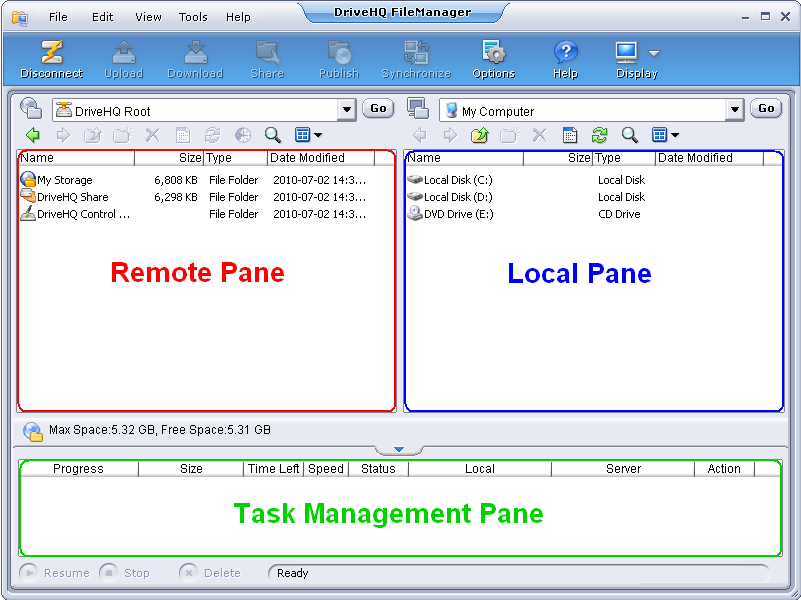
应用程序主屏幕
DriveHQ 文件管理器的主屏幕由三个窗格组成:
在线文件管理窗格(远程窗格);
本地文件管理窗格(本地窗格);
还有文件传输任务管理窗格,其中显示文件列表和文件传输任务的进度。
显示/隐藏文件管理窗格:
您可以点击
在工具栏上选择:
仅显示 DriveHQ.com 文件
显示本地文件和 DriveHQ.com 文件
仅显示本地文件
显示/隐藏文件传输任务管理窗格
您可以显示/隐藏
任务管理窗格
点击
按钮。
链接:
管理本地文件/文件夹
管理在线文件/文件夹
传输文件/文件夹
共享文件/文件夹
发布文件/文件夹
同步文件夹
访问他人的发布
备份文件/文件夹
批量编辑照片 PhotoEditor